4.4. 模型部署
后摩支持单个模型部署到后摩设备上。详情如下表所示:
模型数量\设备数量 |
单个后摩设备 |
多个后摩设备 |
|---|---|---|
单模型 |
支持。 详情参看 单模型单设备部署。 |
支持。 详情参看 单模型多设备部署。 |
多模型 |
支持。 详情参看 多模型部署。 |
支持。 详情参看 多模型部署。 |
4.4.1. 单模型单设备部署
单个模型支持部署在单个后摩设备上。模型编译是将量化后的网络模型编译成可以在后摩设备上运行的二进制模型文件,再在后摩设备上完成模型推理。
部署流程如下图所示:
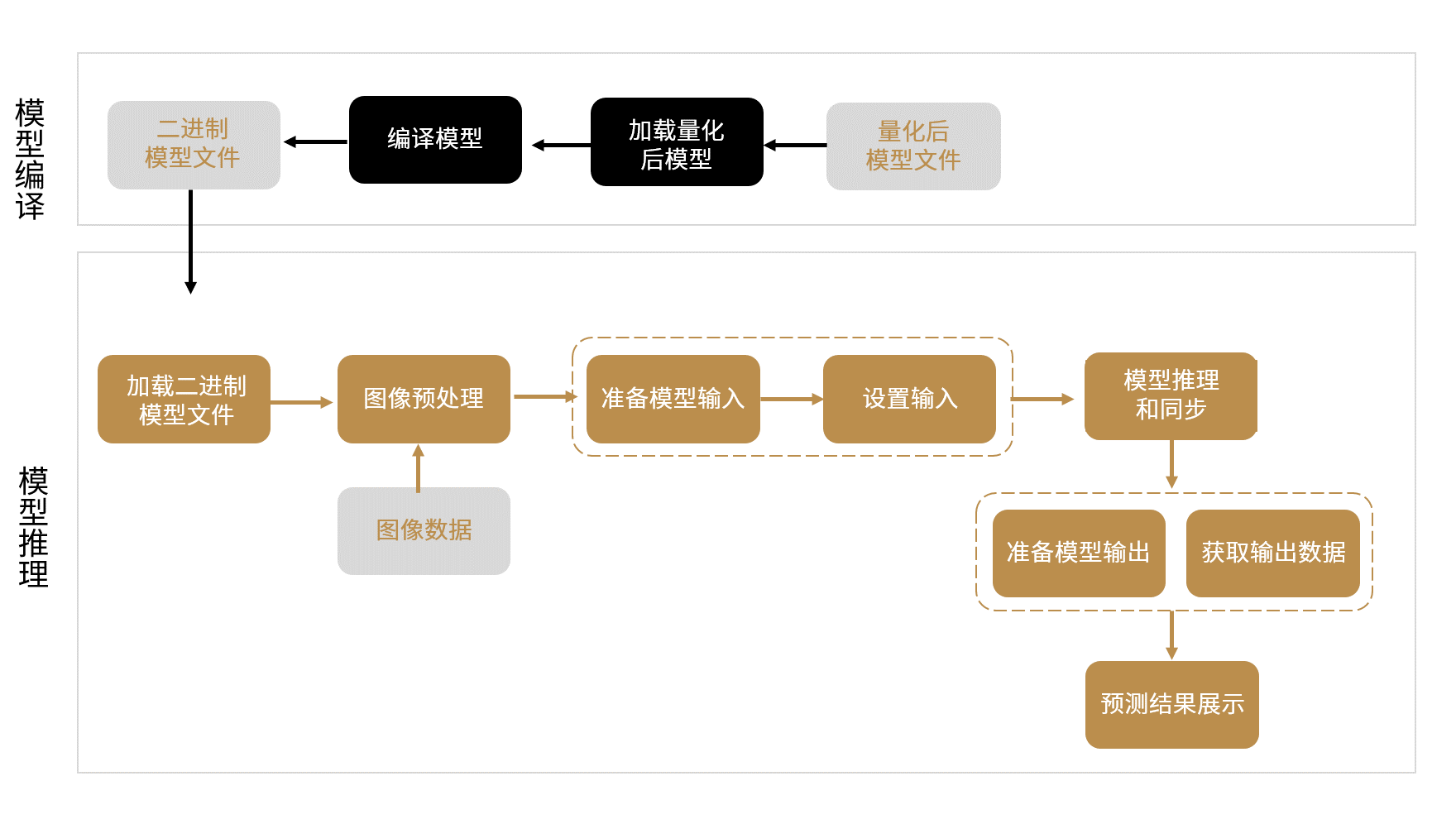
图 4.15 单模型单设备编译和推理流程
4.4.1.1. 单模型单设备样例
下面样例介绍如何在单个后摩设备上推理一个ResNet50网络模型。样例使用单线程、单个stream(默认stream)、1个batch对模型进行推理。示例展示关键步骤代码,仅供参考,不可以直接拷贝运行。有关TCIM API详情,参看 《TCIM开发者手册》。
4.4.1.1.1. C++ API
使用C++ API推理模型,主要步骤如下:
调用
tcim::Module::LoadFromFile加载编译模型,如resnet50.hmm。auto module = tcim::Module::LoadFromFile("resnet50.hmm");
准备模型输入。调用
tcim::Module::GetInputNum获取输入数据的数量。对每个输入:调用
tcim::Module::GetInputName获取输入名称。调用
tcim::Module::GetInputInfo获取输入信息,并调用TensorInfo::AsContiguous创建TensorInfo对象,将张量的内存布局更改为连续。调用
tcim::Tensor::CreateHostTensor为输入数据分配CPU内存。定义一个
input_map,存入输入名称与输入数据的对应关系。
std::map<std::string, tcim::Tensor> input_map;
// Get the total number of inputs
int input_num = module.GetInputNum();
std::cout << "Count of Input: " << input_num << std::endl;
// For each input:
for (int idx = 0; idx < input_num; idx++) {
  // Get the name of the input
  auto input_name = module.GetInputName(idx);
  // Get input data information
  auto input_info = module.GetInputInfo(input_name).AsContiguous();
  std::cout << "Input[" << input_name << "] " << input_info << std::endl;
  // Allocate memory on host CPU for storing input data
  auto input_tensor = tcim::Tensor::CreateHostTensor(input_info);
  // Create a map between input name and input tensor
  input_map.insert(std::pair<std::string, tcim::Tensor>(input_name, input_tensor));
}
图像预处理。示例将
snake.png图片调整为:图像格式从BGR转为YUV420SP。
图像大小调整为 224 x 224 x 3。
cv::Mat img_rgb;
cv::Mat img_yuv;
// Load the image
img_rgb = cv::imread("../../data/snake.png");
// Convert BGR to RGB
ImageProc::BgrToRgb((int8_t *)(img_rgb.data), img_rgb.rows, img_rgb.cols);
// Resize the RGB image to (224, 224)
cv::resize(img_rgb, img_rgb, {224, 224});
// Convert RGB to YUV420P
cv::cvtColor(img_rgb, img_yuv, cv::COLOR_RGB2YUV_I420);
// Calculate the size of the YUV image
int size = 224*224*3;
// Convert image format to YUV420SP and store the result in the input_map at "input.1"
ImageProc::I420To420sp((uint8_t *)input_map.at("input.1").Data(), (uint8_t *)img_yuv.data, size);
准备模型输出。调用
tcim::Module::GetOutputNum获取输出数据数量。对每个输出:调用
tcim::Module::GetOutputName获取输出名称。调用
tcim::Module::GetOutputInfo获取输出信息,并调用TensorInfo::AsContiguous创建TensorInfo对象,将张量的内存布局更改为连续。调用
tcim::Tensor::CreateHostTensor为输出数据分配CPU内存。定义
output_map,插入输出名称与输出数据的对应关系。
// Create a map to store output data
std::map<std::string, tcim::Tensor> output_map;
// Get total number of outputs
int output_num = module.GetOutputNum();
std::cout << "Count of Output: " << output_num << std::endl;
//For each output:
for (int idx = 0; idx < output_num; idx++) {
  // Get the name of the output
  auto output_name = module.GetOutputName(idx);
  // Get the information of the output
  auto output_info = module.GetOutputInfo(output_name).AsContiguous();
  std::cout << "Output[" << output_name << "] " << output_info << std::endl;
  // Allocate memory on host CPU for storing output data
  auto output_tensor = tcim::Tensor::CreateHostTensor(output_info);
  // Insert the output name and tensor into the output map
  output_map.insert(std::pair<std::string, tcim::Tensor>(output_name, output_tensor));
}
调用
tcim::Module::SetInput设置输入。// Loop through each key-value pair in the input_map for (const auto& input : input_map) { // Set each input with the key-value pair from the input_map module.SetInput(input.first, input.second); }
分别调用
tcim::Module::Run和tcim::Module::Sync推理和同步模型。module.Run(); module.Sync();
调用
tcim::Module::GetDevOutput获取推理输出数据。// Loop through each key-value pair in the output_map for (auto& output : output_map) { // Get each output with the key-value pair from the output_map module.GetDevOutput(output.first, output.second); }
预测结果展示,包括conf(置信度)和label(目标类别)等。
// Initialize top1 to store the index of the top-ranked result
int top1 = 0;
// Iterate through each output in the output_map
for (auto& output : output_map) {
  // Create a vector to store pairs of confidence scores and their corresponding indices
  std::vector<std::pair<float, int>> sort_pairs;
  // Set sort_pairs with confidence scores and the corresponding indices
  for (int i = 0; i < 1000; ++i) {
    // Extract confidence score at index i and pair it with its index
    sort_pairs.emplace_back(static_cast<float*>(output.second.Data())[i], i);
  }
  // Sort sort_pairs in descending order based on confidence scores
  std::sort(sort_pairs.begin(), sort_pairs.end(),
            [](const std::pair<float, int>& a, const std::pair<float, int>& b) {
            return a.first > b.first;
            });
  // Specify the topk (top k) results to display
  const int topk = 5;
  // Return the topk results with their index, confidence score, and corresponding label
  for (int i = 0; i < topk; ++i) {
    std::cout << "top" << (i + 1) << ": Index="
              << sort_pairs[i].second << " Conf=" << sort_pairs[i].first
              << ", Label=[" << Imagenet::GetLabel(sort_pairs[i].second) << "]" << std::endl;
  }
  // Check result, modify it when you change model or data
  if (sort_pairs[0].second != 65) {
    std::cout << "top1 != 65" << std::endl;
    exit(-1);
  }
}
4.4.1.1.2. Python API
使用Python API推理模型,主要步骤如下:
注意
引入外部库时,必须先引入PyTorch库(import torch)再引入TCIM(import tcim_lite as tcim),否则会导致报错。
调用
load加载已编译的模型文件resnet50.hmm。module = tcim.runtime.load("resnet50.hmm")
模型预处理。示例将
snake.png图像调整为:图像格式从BGR转为YUV420SP。
图像大小调整为 224 x 224 x 3。
# Load the image
input_data = cv2.imread("../../data/snake.png")
# Resize the image to (224, 224)
input_data = cv2.resize(input_data, (224, 224))
# Transpose the image dimensions to channel first
input_data = np.transpose(input_data, (2, 0, 1))
# Add a batch dimension
input_data = np.expand_dims(input_data, axis=0)
# Convert to torch tensor and ensure data type is float32
input_data = torch.tensor(input_data.astype(np.float32))
# Remove the batch dimension added earlier
input_data = torch.squeeze(input_data, 0)
# Conver image format from BGR to YUV420
from transform import BGR2YUV
rgb2yuv_func = BGR2YUV(fmt='YUV420')
# Apply the RGB to YUV transformation and convert back to numpy array
input_data = torch.unsqueeze(rgb2yuv_func(input_data), 0).numpy()
# Convert data type to uint8
input_data = input_data.astype(np.uint8)
准备模型输入并设置输入数据。调用
get_num_inputs获取输入数据的数量。对每个输入:调用
get_input_name获取输入名称。调用
get_input_info获取输入信息。调用
set_input设置输入。
# Get the total number of inputs
input_num = module.get_num_inputs()
# For each input
for id in range(0, input_num):
    # Get the input name
    input_name = module.get_input_name(id)
    # Get the information about input data
    input_info = module.get_input_info(input_name).ascontiguous()
    print("input[{}] shape = {}, dtype = {}, format = {}".format(input_name, input_info.shape, input_info.dtype, input_info.format.name))
    # Set input data to the module with the given input name
    module.set_input(input_name, input_data)
分别调用
run和sync推理和同步模型。module.run() module.sync()
准备模型输出,并获取输出数据。调用
get_num_outputs获取输出数据的数量。对每个输出:调用
get_output_name获取输出名称。调用
get_output_info获取输出信息。调用
get_output获取输出数据。调用
astype将输出数据转为float32类型tensor。调用
numpy获取反量化后tensor数据,并设置为输出数据。
result_check = True
# Get the total number of outputs
output_num = module.get_num_outputs()
# For each output:
for id in range(0, output_num):
    # Get the output name
    output_name = module.get_output_name(id)
    # Get the information about output data
    output_info = module.get_output_info(output_name).ascontiguous().astype(np.float32)
    print("output[{}] shape = {}, dtype = {}, format = {}".format(output_name, output_info.shape, output_info.dtype,
                                                                output_info.format.name))
    # Get the output data
    output_data = module.get_output(output_name).astype(np.float32).numpy()
预测结果展示,包括prob(置信度)和cls(目标类别ID)等。
from postprocess import softmax
# Convert output data into probabilities
output_data = softmax(output_data)
topk = 5
# Sort the output data in descending order and select the top topk predictions
pred_list = np.argsort(-output_data, axis=1, kind="quicksort").flatten()[0:topk]
prob_list = output_data.flatten()
# Iterate through the top predictions
for i, id in enumerate(pred_list):
    print("top{}: predict cls = {}, prob = {:.6f}".format(i+1, id, prob_list[id]))

# Check result, modify it when you change model or data
assert(pred_list[0] == 65)
4.4.3. 单模型多设备部署
单个模型可以同时部署在多个后摩逻辑设备上。每颗 M50芯片都会映射为一个带有唯一ID的逻辑设备,用户在模型部署和推理时通过后摩设备逻辑ID 选择设备。当 M50产品包含多颗芯片时,可以利用多个逻辑设备实现模型的并行部署和推理。
与单模型单设备部署相比,多设备部署在代码使用上主要有以下区别:
模型编译设置:
调用
build_from_hmonnx接口时,需通过ndevice指定参与推理的逻辑设备数量。模型编译后生成二进制模型文件格式为.hmms。模型部署前初始化:
在创建
Weight Manager前,必须先通过DevManager指定要使用的后摩逻辑设备 ID 及后端类型,示例如下:dev_manager = tcim.runtime.DevManager([1,0], "Xh2HalBackend") weight_manager = tcim.runtime.WeightManager(dev_manager)
示例中,模型将部署在逻辑设备 1 和逻辑设备 0 上。
除以上差异外,其余推理流程与单模型单设备部署保持一致。
4.4.4. 多模型部署
多模型支持部署在单个后摩设备上,也支持部署在同一台主机的多个后摩设备上。模型编译在主机端完成,编译方式与单模型一致;每个模型可按常规方式生成对应的模型文件。
推理阶段既支持多个不同模型并发推理,也支持同一个模型创建多个推理实例进行多次推理。通常可通过多线程、多stream的方式实现并发执行。多个线程在推理过程中会竞争后摩设备上的计算资源,因此不同线程实际完成的推理次数可能不固定。
该模式属于多模型或多实例并发推理,不等同于将单个模型切分到多个设备上的模型并行推理。
推理流程如下图所示:
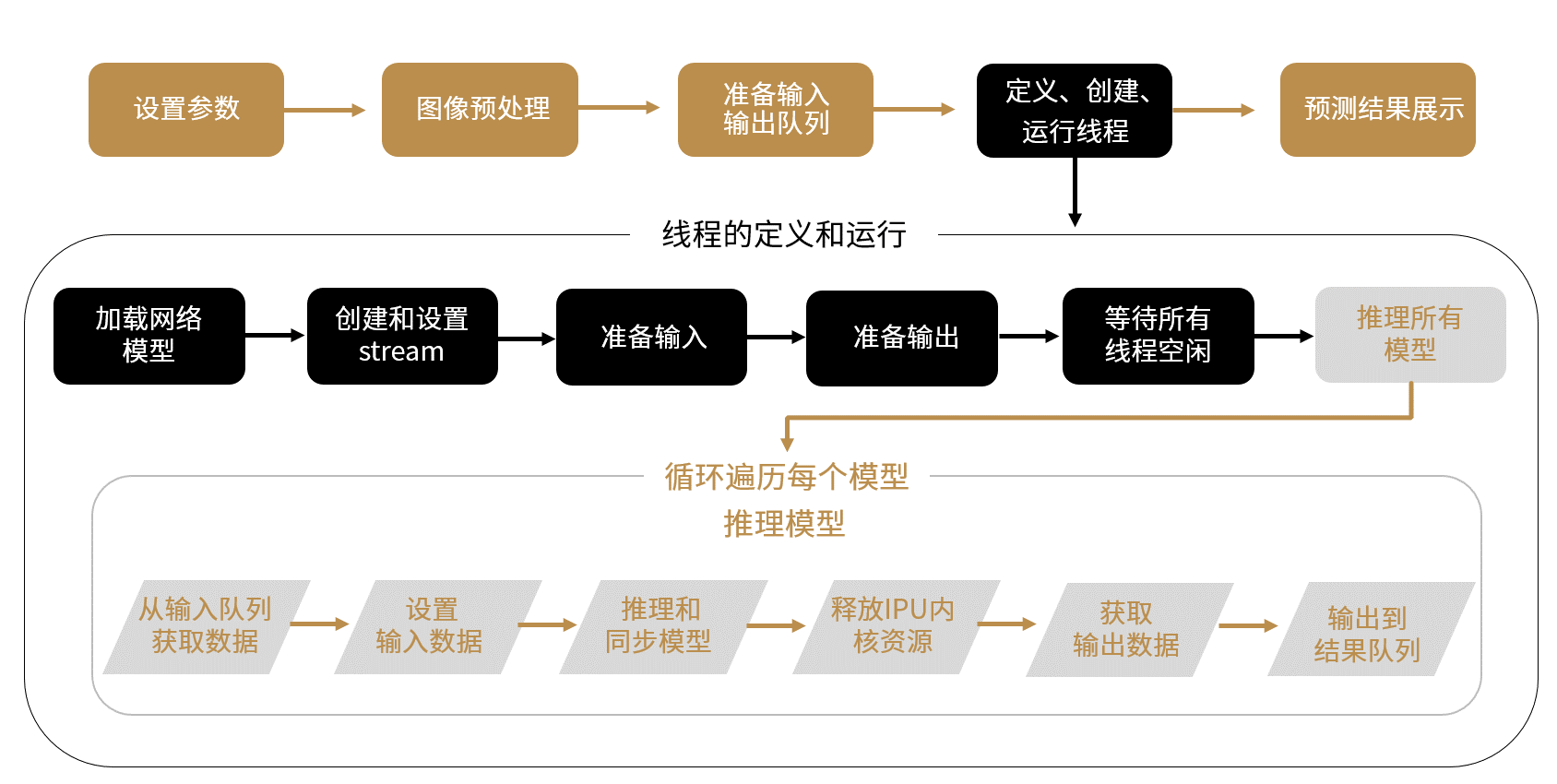
图 4.16 多模型推理流程
4.4.4.1. 限制说明
支持多个后摩设备部署,但目前仅在4个后摩设备上做了验证。