4.3. LLM推理
TCIM支持部署LLM(Large Language Model,大语言模型)到后摩硬件设备上,包括Qwen3.5、Qwen3.6等模型。
Qwen模型包括以下部分:
Prefill模型:用来计算所有输入token,生成对应的KV Cache,并预测第一个输出token。
Decode模型:迭代的将预测输出的token送入模型。每轮将上一次预测出的token的embedding输入模型,复用并更新已有的KV Cache、recurrent cache,然后根据本轮Decode输出预测下一个token。
下面以Qwen模型为例,介绍如何在单batch场景下,推理Qwen模型。示例展示关键步骤代码,仅供参考,不可以直接拷贝运行。完整示例位于开发样例包中 houmo-examples_<release>/houmo-examples-xh2/models/llm 目录下(仅限Linux系统)。
4.3.1. 推理模型步骤
Qwen模型推理主要的流程如下:
用户输入文本作为查询(query)。
在tokenizer阶段,将文本转换为模型可以处理的token ids。
在embedding阶段,将token ids转换为模型输入embedding。
在prefill阶段,对输入文本进行推理,初始化上下文缓存,并生成第一个输出token。
在Decode阶段,基于已有上下文缓存逐token迭代生成后续token。
在detokenize阶段,将输出token ids转换为最终输出文本(response)。
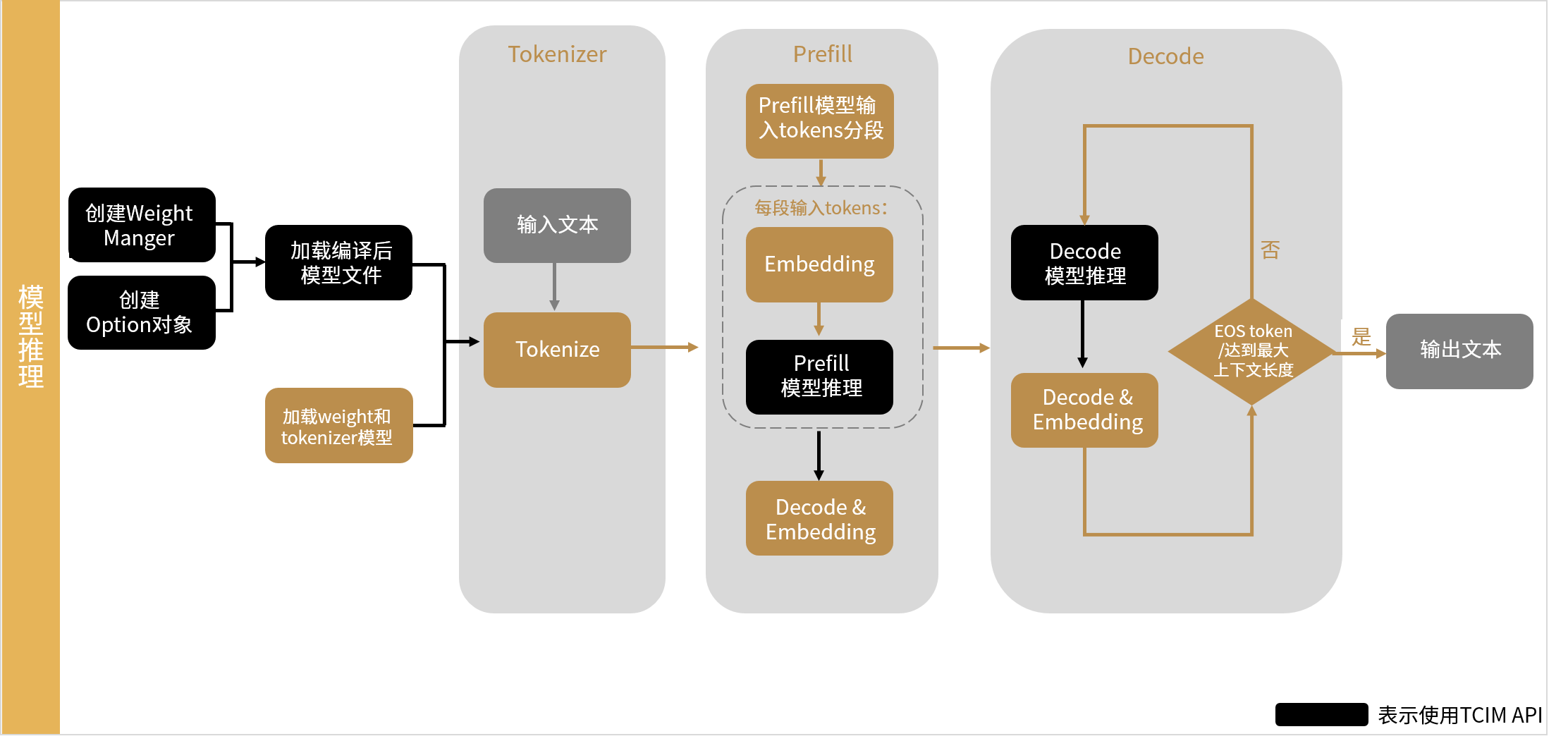
图 4.14 Qwen模型推理主要流程
模型部署主要使用PyTorch API和TCIM Python API完成。TCIM Python API主要用于推理模型。主要步骤如下:
注意
引入外部库时,必须先引入PyTorch库(import torch)再引入TCIM(import tcim_lite as tcim),否则会导致报错。
导入依赖。
import os
import math
import numpy as np
import torch
import torch.nn.functional as F

from transformers import AutoTokenizer
import tcim_lite as tcim
设置模型路径和环境变量。推理前需要准备编译后的
.hmm模型、量化embedding权重和tokenizer目录。示例如下:HOUMO_TARGET = os.getenv("HOUMO_TARGET", "xh2") MODEL_NAME = "qwen3.5" MODEL_SIZE = "9b" PREFILL_PATH = os.path.join( "output", HOUMO_TARGET, f"{MODEL_NAME}-{MODEL_SIZE}_prefill.hmm", ) DECODE_PATH = os.path.join( "output", HOUMO_TARGET, f"{MODEL_NAME}-{MODEL_SIZE}_decode.hmm", ) EMBEDDING_PATH = os.path.join( "output", HOUMO_TARGET, "hmquant", "quant_embedding.pt", ) TOKENIZER_PATH = "Qwen3.5-9B"
如果使用多设备,Prefill和Decode模型文件后缀需要从
.hmm切换为.hmms:if ndevice > 1: if PREFILL_PATH.endswith(".hmm"): PREFILL_PATH = PREFILL_PATH.replace(".hmm", ".hmms") if DECODE_PATH.endswith(".hmm"): DECODE_PATH = DECODE_PATH.replace(".hmm", ".hmms")
初始化设备、WeightManager和模型。示例如下:
device_list = list(range(ndevice))
dev_manager = tcim.runtime.DevManager(
    device_list,
    "Xh2HalBackend",
)
weight_manager = tcim.runtime.WeightManager(dev_manager)
option1 = tcim.runtime.Option(weight_manager)
option2 = tcim.runtime.Option(weight_manager)
self.prefill = tcim.runtime.load(
    prefill_path,
    option=prefill_option,
)
加载Decode模型前,需要设置dummy tensors。该逻辑用于让Decode复用Prefill中的缓存输入。
dummy_tensor_names = []

for i in range(self.prefill.get_num_inputs()):
    input_name = self.prefill.get_input_name(i)
    if "model_layers" in input_name:
        dummy_tensor_names.append(input_name)
decode_option.set_dummy_tensors(dummy_tensor_names)
self.decode = tcim.runtime.load(
    decode_path,
    option=decode_option,
)
获取推理关键参数。
prefill_length:Prefill阶段每次迭代可处理的总token数。通过Prefill模型的第一个输入张量的第一维获取。embedding_len:输入 token 的 embedding 向量维度。通过Prefill模型的第一个输入张量的第二维获取。context_max_length:Decode阶段可处理的最大上下文长度。通过Decode模型的第一个输入张量的第二维获取。batch:Decode 模型支持的batch数。通过Decode模型的第一个输入张量的 shape的第0维获取。
示例如下:
self.prefill_length = self.prefill.get_input_info(
    self.prefill.get_input_name(0)
).shape[1]

self.embedding_len = self.prefill.get_input_info(
    self.prefill.get_input_name(0)
).shape[2]

self.context_max_length = self.decode.get_input_info(
    self.decode.get_input_name(7)
).shape[2]

self.batch = self.decode.get_input_info(
    self.decode.get_input_name(0)
).shape[0]
初始化Decode阶段上下文缓存。Prefill 和 Decode 需要共享缓存。Qwen3.5中不仅要处理 model_layers,还要处理 conv_cache 和 recurrent_state。
示例如下:
for i in range(self.prefill.get_num_inputs()):
    input_name = self.prefill.get_input_name(i)

    if "model_layers" in input_name:
        cache = self.prefill.get_dev_input(input_name)
        self.decode.set_dev_input(input_name, cache)

    if "conv_cache" in input_name:
        output_name = input_name.replace(
            "past_conv_cache_",
            "conv_cache_out_",
        )
        cache = self.prefill.get_dev_input(input_name)

        self.prefill.set_dev_output(output_name, cache)
        self.decode.set_dev_input(input_name, cache)
        self.decode.set_dev_output(output_name, cache)

    if "recurrent_state" in input_name:
        output_name = input_name.replace(
            "past_recurrent_state_",
            "recurrent_state_out_",
        )
        cache = self.prefill.get_dev_input(input_name)

        self.prefill.set_dev_output(output_name, cache)
        self.decode.set_dev_input(input_name, cache)
        self.decode.set_dev_output(output_name, cache)
Decode模型的current_length输入需要初始化为1,示例如下:
current_length_input = np.array([1]).astype("int32")
decode_current_length_name = self.decode.get_input_name(5)

self.decode.set_input(
    decode_current_length_name,
    current_length_input,
)
如果开启多轮对话且不清空 history,应保留 cache;如果每次请求独立推理,则需要清空 cache。示例如下:
def clear_cache(self):
    for i in range(self.prefill.get_num_inputs()):
        input_name = self.prefill.get_input_name(i)

        if "conv_cache" in input_name or "recurrent_state" in input_name:
            info = self.prefill.get_dev_input(input_name).info
            zeros = np.zeros(info.shape, dtype=np.float16)

            self.prefill.set_input(input_name, zeros)
            self.decode.set_input(input_name, zeros)
加载tokenizer和embedding权重。Tokenizer用于将文本转成token ids,embedding权重用于将 token ids转成模型输入向量。示例如下:
self.tokenizer = AutoTokenizer.from_pretrained(
    tokenizer_dir,
    trust_remote_code=True,
)

embedding_weight = torch.load(
    embedding_path,
    map_location="cpu",
    weights_only=False,
)

if isinstance(embedding_weight, dict):
    if "weight" not in embedding_weight:
        raise KeyError(
            f"Embedding state_dict at {embedding_path} does not contain 'weight'"
        )
    embedding_tensor = embedding_weight["weight"]
else:
    embedding_tensor = embedding_weight.weight

self.embedding_weight = embedding_tensor.reshape(
    -1,
    self.embedding_len,
).float()
定义辅助函数。Qwen3.5的Prefill和Decode均需要 position ids和linear attention mask。示例如下:
def create_linear_attn_mask(fill_length: int, new_cache_length: int) -> np.ndarray:
    mask = np.zeros((1, fill_length), dtype=np.float16)
    mask[0, :new_cache_length] = 1.0
    return mask
纯文本 position ids 生成:
def get_rope_index_text(valid_length: int, current_length: int):
    pos_1d = torch.arange(
        valid_length,
        valid_length + current_length,
        dtype=torch.long,
    )

    position_ids = pos_1d.unsqueeze(0).unsqueeze(0)
    position_ids = position_ids.expand(3, 1, current_length)

    mrope_position_deltas = torch.tensor([[0]], dtype=torch.long)

    return position_ids, mrope_position_deltas
Tokenize输入文本。将用户输入文本转换为模型可处理的token ids。如果输入长度超过最大上下文长度,则提示错误。示例如下:
messages = [
    {"role": "system", "content": "You are a helpful assistant."},
    {"role": "user", "content": question},
]

text = self.tokenizer.apply_chat_template(
    messages,
    tokenize=False,
    add_generation_prompt=True,
    enable_thinking=False,
)

inputs = self.tokenizer(
    text,
    return_tensors="pt",
    add_special_tokens=False,
)

all_input_ids = inputs["input_ids"]
input_echo_len = all_input_ids.numel()

if input_echo_len >= self.context_max_length:
    raise ValueError(
        f"Input length {input_echo_len} exceeds max "
        f"{self.context_max_length}, please shorten it."
    )
Prefill 阶段。Prefill 阶段用于处理完整输入 prompt,并生成第一个 token。如果输入 token 数超过 prefill_length,需要分段执行 Prefill。
示例如下:
prefill_loop_round = math.ceil(input_echo_len / self.prefill_length)

for round_idx in range(prefill_loop_round):
    valid_length = round_idx * self.prefill_length + self.context_length

    if round_idx == prefill_loop_round - 1:
        current_length = input_echo_len - round_idx * self.prefill_length
        chunk_end = input_echo_len
    else:
        current_length = self.prefill_length
        chunk_end = (round_idx + 1) * self.prefill_length

    chunk_start = round_idx * self.prefill_length
    input_ids = all_input_ids[:, chunk_start:chunk_end]

    inputs_embeds = F.embedding(
        input_ids,
        self.embedding_weight,
    )

    effective_length = input_ids.size(-1)

    pad_embeds = torch.zeros(
        1,
        self.prefill_length - effective_length,
        inputs_embeds.size(-1),
        dtype=inputs_embeds.dtype,
        device=inputs_embeds.device,
    )

    input_data = torch.cat(
        [inputs_embeds, pad_embeds],
        dim=1,
    ).reshape(
        1,
        self.prefill_length,
        self.embedding_len,
    )

    position_ids, _ = get_rope_index_text(
        valid_length,
        self.prefill_length,
    )

    valid_length_data = np.array([valid_length]).astype("int32")
    current_length_data = np.array([current_length]).astype("int32")

    linear_attn_mask_data = create_linear_attn_mask(
        self.prefill_length,
        current_length,
    )

    self.prefill.set_input(
        self.prefill.get_input_name(0),
        input_data.numpy(),
    )
    self.prefill.set_input(
        self.prefill.get_input_name(1),
        position_ids[0:1].numpy(),
    )
    self.prefill.set_input(
        self.prefill.get_input_name(2),
        position_ids[1:2].numpy(),
    )
    self.prefill.set_input(
        self.prefill.get_input_name(3),
        position_ids[2:3].numpy(),
    )
    self.prefill.set_input(
        self.prefill.get_input_name(4),
        valid_length_data,
    )
    self.prefill.set_input(
        self.prefill.get_input_name(5),
        current_length_data,
    )
    self.prefill.set_input(
        self.prefill.get_input_name(6),
        linear_attn_mask_data,
    )

    self.prefill.run()
    self.prefill.sync()
获取Prefill输出,并准备Decode输入,示例如下:
logits = self.prefill.get_output(
    self.prefill.get_output_name(0)
).numpy()

next_id = logits.argmax(-1)[0]

prefill_response = self.tokenizer.decode(next_id)

chat_history_ids = all_input_ids[0]

next_id = torch.from_numpy(next_id)

chat_history_ids = torch.cat(
    [chat_history_ids, next_id],
    dim=-1,
)

input_data = F.embedding(
    next_id.unsqueeze(0),
    self.embedding_weight,
).reshape(
    1,
    1,
    -1,
)

all_response = prefill_response
self.context_length += input_echo_len
Decode阶段。Decode阶段逐token生成输出,直到遇到EOS token或达到最大上下文长度。示例如下:
skip_tokens = 0
slide_len = 10

last_response = self.tokenizer.decode(
    chat_history_ids.tolist()[-slide_len:]
)

decode_response = ""

while True:
    if self.context_length >= self.context_max_length:
        break

    position_ids, _ = get_rope_index_text(
        self.context_length,
        1,
    )

    valid_length_data = np.array(
        [self.context_length],
    ).astype("int32")

    linear_attn_mask_data = create_linear_attn_mask(
        1,
        1,
    )

    self.decode.set_input(
        self.decode.get_input_name(0),
        input_data.numpy(),
    )
    self.decode.set_input(
        self.decode.get_input_name(1),
        position_ids[0].numpy(),
    )
    self.decode.set_input(
        self.decode.get_input_name(2),
        position_ids[1].numpy(),
    )
    self.decode.set_input(
        self.decode.get_input_name(3),
        position_ids[2].numpy(),
    )
    self.decode.set_input(
        self.decode.get_input_name(4),
        valid_length_data,
    )
    self.decode.set_input(
        self.decode.get_input_name(6),
        linear_attn_mask_data,
    )

    self.decode.run()
    self.decode.sync()

    logits = self.decode.get_output(
        self.decode.get_output_name(0)
    ).numpy()

    if logits.ndim == 3:
        logits_for_sample = logits[0, 0]
    elif logits.ndim == 2:
        logits_for_sample = logits[0]
    else:
        logits_for_sample = logits

    next_token_id = int(logits_for_sample.argmax(-1))
    next_id = torch.tensor([next_token_id])

    if next_token_id == self.tokenizer.eos_token_id:
        all_response += decode_response
        break

    chat_history_ids = torch.cat(
        [chat_history_ids, next_id],
        dim=-1,
    )

    decode_response = self.tokenizer.decode(
        chat_history_ids.tolist()[-(slide_len + 1) - skip_tokens:]
    )[len(last_response):]

    if decode_response != "" and is_valid_char(ord(decode_response[-1])):
        print(decode_response, end="", flush=True)
        all_response += decode_response

        last_response = self.tokenizer.decode(
            chat_history_ids.tolist()[-slide_len:]
        )
        skip_tokens = 0
    else:
        skip_tokens += 1

    input_data = F.embedding(
        next_id.unsqueeze(0),
        self.embedding_weight,
    ).reshape(
        1,
        1,
        -1,
    )

    self.context_length += 1
slide_len仅用于增量解码文本时截取最近若干token,避免输出半个字符或不完整片段;模型真正的上下文由KV cache和context_length管理。
完整示例代码参看开发样例包中 houmo-examples_<release>/houmo-examples-xh2/models/llm/qwen3.5 目录下。
4.3.2. MTP多token投机解码流程
Qwen3.5模型示例支持MTP(Multi-Token Prediction)投机解码。该功能用于优化Decode阶段性能:先由MTP Draft模型预测多个候选token,再由Verify模型一次性校验这些候选token。被 Verify接受的token会直接提交;未被接受的位置则使用Verify模型输出的token继续生成。
MTP是可选功能。不开启MTP时,使用前文标准 Prefill + Decode 流程即可。开启MTP时,需要额外准备MTP模型文件,并使用不同的模型加载、缓存绑定和Decode循环逻辑。
4.3.2.1. 功能差异
标准推理流程包含两个模型: prefill 和 decode。
MTP推理流程包含四类模型:
prefill:主模型Prefill,处理prompt,并输出主模型hidden states。prefill_mtp:MTP Prefill,用于初始化MTP Draft模型缓存。decode_mtp:MTP Draft Decode,用于草拟候选token。decode_verify:Verify Decode,用于校验当前token和draft tokens。
因此,MTP不只是替换 ecode模型,而是将Decode阶段改造成 “Draft 生成 + Verify 校验 + 接受 token 提交”的流程。
4.3.2.2. 模型文件
标准流程需要准备:
PREFILL_PATH = os.path.join(
    "output",
    HOUMO_TARGET,
    f"{MODEL_NAME}-{MODEL_SIZE}_prefill.hmm",
)

DECODE_PATH = os.path.join(
    "output",
    HOUMO_TARGET,
    f"{MODEL_NAME}-{MODEL_SIZE}_decode.hmm",
)
MTP 流程需要额外准备:
PREFILL_MTP_PATH = os.path.join(
    "output",
    HOUMO_TARGET,
    f"{MODEL_NAME}-{MODEL_SIZE}_prefill_mtp.hmm",
)

DECODE_MTP_PATH = os.path.join(
    "output",
    HOUMO_TARGET,
    f"{MODEL_NAME}-{MODEL_SIZE}_decode_mtp.hmm",
)

DECODE_VERIFY_PATH = os.path.join(
    "output",
    HOUMO_TARGET,
    f"{MODEL_NAME}-{MODEL_SIZE}_decode.hmm",
)
其中 decode_verify 通常复用主Decode模型文件,但运行方式与标准 Decode不同:它一次接收 current_token + draft_tokens,用于批量校验候选token。
多设备场景下,相关模型后缀需要从 .hmm 切换为 .hmms:
if ndevice > 1:
    for path_name in [
        "PREFILL_PATH",
        "PREFILL_MTP_PATH",
        "DECODE_MTP_PATH",
        "DECODE_VERIFY_PATH",
    ]:
        path_value = globals()[path_name]
        if path_value.endswith(".hmm"):
            globals()[path_name] = path_value.replace(".hmm", ".hmms")
4.3.2.3. 模型加载
MTP推理需要先加载主 prefill 和 prefill_mtp,再加载 decode_verify 和 decode_mtp。
decode_verify 需要复用主 prefill 中的 KV cache 输入,因此加载前需要设置 dummy tensors:
device_list = list(range(ndevice))
dev_manager = tcim.runtime.DevManager(
    device_list,
    "Xh2HalBackend",
)

weight_manager = tcim.runtime.WeightManager(dev_manager)

prefill_option = tcim.runtime.Option(weight_manager)
prefill_mtp_option = tcim.runtime.Option(weight_manager)
decode_mtp_option = tcim.runtime.Option(weight_manager)
verify_option = tcim.runtime.Option(weight_manager)

prefill = tcim.runtime.load(
    PREFILL_PATH,
    option=prefill_option,
)

prefill_mtp = tcim.runtime.load(
    PREFILL_MTP_PATH,
    option=prefill_mtp_option,
)

dummy_tensor_names = []

for i in range(prefill.get_num_inputs()):
    input_name = prefill.get_input_name(i)
    if "model_layers" in input_name:
        dummy_tensor_names.append(input_name)

verify_option.set_dummy_tensors(dummy_tensor_names)

decode_verify = tcim.runtime.load(
    DECODE_VERIFY_PATH,
    option=verify_option,
)

decode_mtp = tcim.runtime.load(
    DECODE_MTP_PATH,
    option=decode_mtp_option,
)
4.3.2.4. 缓存绑定
MTP 推理中存在两类缓存:
主模型缓存: 由
prefill和decode_verify共享。MTP Draft缓存: 由
prefill_mtp和decode_mtp共享。
首先,需要让 decode_verify 复用主 prefill 的 KV cache:
for i in range(prefill.get_num_inputs()):
    input_name = prefill.get_input_name(i)

    if "model_layers" in input_name:
        cache = prefill.get_dev_input(input_name)
        decode_verify.set_dev_input(input_name, cache)
对于Qwen3.5,还需要处理 conv_cache 和 recurrent_state。Verify阶段一次处理多个token,但最终只能提交被接受token对应的状态,因此这些缓存需要和接受token数保持一致。
MTP Draft模型自身也需要缓存绑定。prefill_mtp 和 decode_mtp 的cache shape与dtype必须一致,decode_mtp 需要复用 prefill_mtp 初始化后的缓存。
注意
不同导出版本中,MTP cache 的输入名可能不同。实际实现时建议根据模型输入名
动态匹配 cache 名称,而不是固定写死 past_key_cache 或
past_value_cache。
4.3.2.5. MTP Prefill
MTP Prefill用于初始化Draft模型缓存。主 prefill 处理 prompt 时,会输出hidden states;这些hidden states需要和对应token一起输入 prefill_mtp。
核心逻辑如下:
def run_mtp_prefill_chunk(
    hidden_states: np.ndarray,
    token_ids: np.ndarray,
    past_seq_len: int,
):
    valid_len = token_ids.shape[-1]

    input_embedding = F.embedding(
        torch.as_tensor(token_ids.reshape(1, -1), dtype=torch.long),
        embedding_weight,
    ).numpy()

    position_ids, _ = get_rope_index_text(
        past_seq_len,
        valid_len,
    )

    prefill_mtp.set_input(
        prefill_mtp.get_input_name(0),
        hidden_states.astype(np.float16),
    )

    prefill_mtp.set_input(
        prefill_mtp.get_input_name(1),
        input_embedding.astype(np.float16),
    )

    prefill_mtp.set_input(
        prefill_mtp.get_input_name(2),
        position_ids.numpy(),
    )

    prefill_mtp.set_input(
        prefill_mtp.get_input_name(3),
        np.array([past_seq_len]).astype("int32"),
    )

    prefill_mtp.set_input(
        prefill_mtp.get_input_name(4),
        np.array([valid_len]).astype("int32"),
    )

    prefill_mtp.run()
    prefill_mtp.sync()
4.3.2.6. MTP Decode
MTP Decode每轮包含三个阶段:
Draft: 使用
decode_mtp生成多个候选token。Verify: 使用
decode_verify校验current_token + draft_tokens。Commit: 提交被接受的 token,并更新上下文和缓存状态。
Draft阶段示例:
def run_mtp_step(
    hidden_state: np.ndarray,
    token_id: int,
    past_seq_len: int,
):
    token_tensor = torch.tensor([[token_id]], dtype=torch.long)

    input_embedding = F.embedding(
        token_tensor,
        embedding_weight,
    ).numpy()

    position_ids, _ = get_rope_index_text(
        past_seq_len,
        1,
    )

    decode_mtp.set_input(
        decode_mtp.get_input_name(0),
        hidden_state.astype(np.float16),
    )

    decode_mtp.set_input(
        decode_mtp.get_input_name(1),
        input_embedding.astype(np.float16),
    )

    decode_mtp.set_input(
        decode_mtp.get_input_name(2),
        position_ids.numpy(),
    )

    decode_mtp.set_input(
        decode_mtp.get_input_name(3),
        np.array([past_seq_len]).astype("int32"),
    )

    decode_mtp.set_input(
        decode_mtp.get_input_name(4),
        np.array([1]).astype("int32"),
    )

    decode_mtp.run()
    decode_mtp.sync()

    logits = decode_mtp.get_output(
        decode_mtp.get_output_name(0)
    ).numpy()

    next_hidden = decode_mtp.get_output(
        decode_mtp.get_output_name(1)
    ).numpy()

    next_token_id = int(logits.argmax(-1).reshape(-1)[0])

    return next_token_id, next_hidden
连续生成多个draft tokens:
def run_draft_mtp(
    current_token: int,
    last_hidden: np.ndarray,
    mtp_past_seq_len: int,
    num_drafts: int,
):
    draft_tokens = []
    token = current_token
    hidden = last_hidden

    for offset in range(num_drafts):
        token, hidden = run_mtp_step(
            hidden,
            token,
            mtp_past_seq_len + offset,
        )
        draft_tokens.append(token)

    return draft_tokens, hidden
4.3.2.7. Verify与提交
Verify 阶段将当前token和draft tokens拼接后送入 decode_verify:
verify_tokens = [current_token] + draft_tokens

token_ids = torch.as_tensor(
    [verify_tokens],
    dtype=torch.long,
)

input_embedding = F.embedding(
    token_ids,
    embedding_weight,
).numpy()

decode_verify.set_input(
    decode_verify.get_input_name(0),
    input_embedding,
)

decode_verify.set_input(
    decode_verify.get_input_name(4),
    np.array([past_seq_len]).astype("int32"),
)

decode_verify.set_input(
    decode_verify.get_input_name(5),
    np.array([len(verify_tokens)]).astype("int32"),
)

linear_attn_mask_data = create_linear_attn_mask(
    len(verify_tokens),
    len(verify_tokens),
)

decode_verify.set_input(
    decode_verify.get_input_name(6),
    linear_attn_mask_data,
)

decode_verify.run()
decode_verify.sync()

verify_logits = decode_verify.get_output(
    decode_verify.get_output_name(0)
).numpy()

verify_hidden = decode_verify.get_output(
    decode_verify.get_output_name(1)
).numpy()
然后逐个判断draft token是否被接受:
accepted_count = 0

for token_idx, draft_token in enumerate(draft_tokens):
    predicted = int(
        verify_logits[:, token_idx : token_idx + 1, :]
        .argmax(-1)
        .reshape(-1)[0]
    )

    if predicted != int(draft_token):
        break

    accepted_count += 1
其中:
accepted_count表示本轮被接受的 draft token 数。accepted_steps表示本轮实际提交到上下文的 token 数,至少包含current_token:
accepted_steps = accepted_count + 1

past_seq_len += accepted_steps
mtp_past_seq_len += accepted_steps

for token_idx in range(accepted_count):
    token = int(draft_tokens[token_idx])
    generated_ids.append(token)

    if token == tokenizer.eos_token_id:
        stop = True
        break
如果draft token未全部接受,则从拒绝位置取Verify输出作为replacement token;如果全部接受,则取Verify最后一个位置输出作为下一个token:
if accepted_count < len(draft_tokens):
    current_token = int(
        verify_logits[:, accepted_count : accepted_count + 1, :]
        .argmax(-1)
        .reshape(-1)[0]
    )
else:
    current_token = int(
        verify_logits[:, -1:, :]
        .argmax(-1)
        .reshape(-1)[0]
    )

last_hidden = verify_hidden[
    :,
    accepted_count : accepted_count + 1,
    :
].copy()
4.3.2.8. 指标统计
MTP推理建议统计以下指标,用于评估投机解码效果:
rounds:MTP Decode轮数。draft_tokens:Draft模型生成的候选token总数。accepted:被 Verify 接受的draft token总数。acceptance_rate:接受率,计算方式为accepted / draft_tokens。avg_accepted_per_round:平均每轮接受的draft token数。drafts_per_round:每轮草拟token数,通常等于Verify输入长度减 1。mtp_prefill_tokens:MTP Prefill阶段处理的token数。
示例:
acceptance_rate = accepted / max(draft_tokens, 1)
avg_accepted_per_round = accepted / max(rounds, 1)

print(
    "[SpecDecode] "
    f"rounds={rounds} "
    f"draft_tokens={draft_tokens} "
    f"accepted={accepted} "
    f"avg_accepted_per_round={avg_accepted_per_round:.2f} "
    f"acceptance_rate={acceptance_rate:.2%} "
    f"mtp_prefill_tokens={mtp_prefill_tokens} "
    f"drafts_per_round={drafts_per_round}"
)
4.3.2.9. 注意事项
MTP是可选加速功能,不影响标准
Prefill + Decode推理流程。MTP需要额外的
prefill_mtp和decode_mtp模型文件。decode_verify一次处理多个token,但只能提交被接受token对应的状态。对Qwen3.5,需要同时维护
model_layers、conv_cache和recurrent_state。slide_len等增量文本解码逻辑仍可沿用标准Decode流程;它只用于避免输出 半个字符或不完整片段,模型真实上下文由cache和context_length管理。